


8 min read
Prenly Workspace: a smarter digital publishing workflow for publishers

Publishing a digital newspaper or magazine involves much more than uploading a PDF. Editorial teams need to create and organize content, manage editions, collaborate across teams, control access, schedule publication, connect existing systems and make sure readers receive the right content at the right time.
Prenly Workspace brings these parts of the digital publishing workflow together in one place.
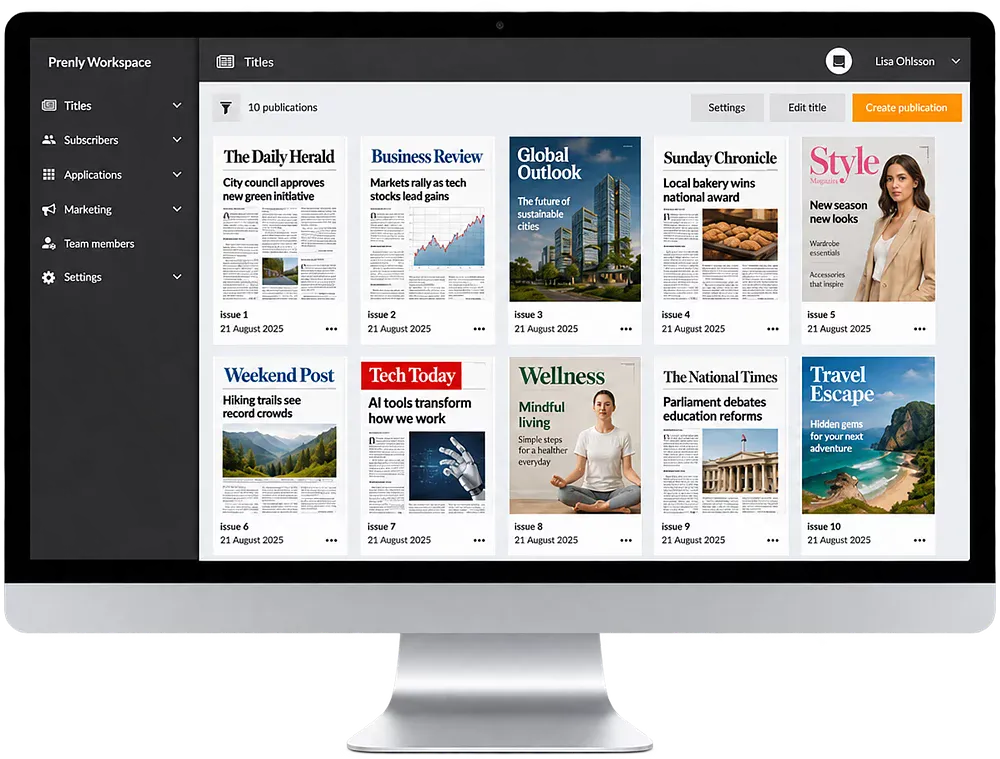
Designed for newspapers, magazines and media groups, Prenly Workspace gives publishers a central environment for creating, organizing, managing and distributing digital publications across apps and the web.
What is Prenly Workspace?
Prenly Workspace is the publishing environment within the Prenly digital publishing platform.
It is where editorial and publishing teams manage the content and settings behind their digital publications – from individual articles and complete editions to access rights, publication schedules, push notifications and integrations.
Instead of managing different parts of the publishing process in disconnected systems, publishers can use Workspace as a central hub for their digital publishing workflow.
Content published through Workspace can then be delivered to readers through Prenly Reader, creating a connected workflow from production to reading experience.
From editorial content to digital publication
A modern publishing workflow often includes several steps before an article or edition reaches the reader.
Content needs to be created or imported, structured correctly, reviewed, approved, scheduled and distributed. For publishers working with several titles, teams or publication formats, that process can quickly become complex.
Prenly Workspace is designed to make those workflows easier to manage.
Editors can create articles, add images and video, organize content into sections and categories and connect related stories. Publication statuses such as Draft, Approved and On Hold make it easier for teams to see where content is in the editorial process.
Once the content is ready, publishers can control when it becomes available and where it should appear.
Create and organize digital content
Publishers are no longer limited to reproducing the printed edition online.
Digital publications can combine editions, individual articles, multimedia, audio and other types of editorial content.
In Prenly Workspace, teams can create and edit articles directly, add media and structure content into sections and categories. Related articles and editions can also be connected to create clearer reading paths and give readers more context.
For a newspaper publisher, this can mean combining the familiar newspaper edition with continuously updated digital content.
For magazine publishers, it creates opportunities to publish additional content between editions and give existing material a longer digital life.
Manage the editorial workflow
Digital publishing often involves several people with different responsibilities.
Editors may create and review content, administrators may manage publication settings and marketers may work with campaigns, notifications and reader engagement.
Prenly Workspace supports roles and permissions so access can be adapted to different responsibilities within the organization.
Editorial statuses also provide a clearer overview of what is being prepared, what has been approved and what should remain unpublished.
For larger publishing organizations, this can make it easier to establish consistent workflows without requiring every team or title to work in exactly the same way.
Schedule publishing and control availability
Not every article or edition should be published immediately.
Prenly Workspace allows publishers to schedule content and manage publication dates, times and visibility. Teams can prepare content in advance, review it and decide exactly when it should become available to readers.
Publishers can also use tags and access rules to control who can access particular content.
That can support different subscription packages, campaign access or publishing models – for example, giving a specific audience access to selected editions for a limited period.
Share publications with controlled access
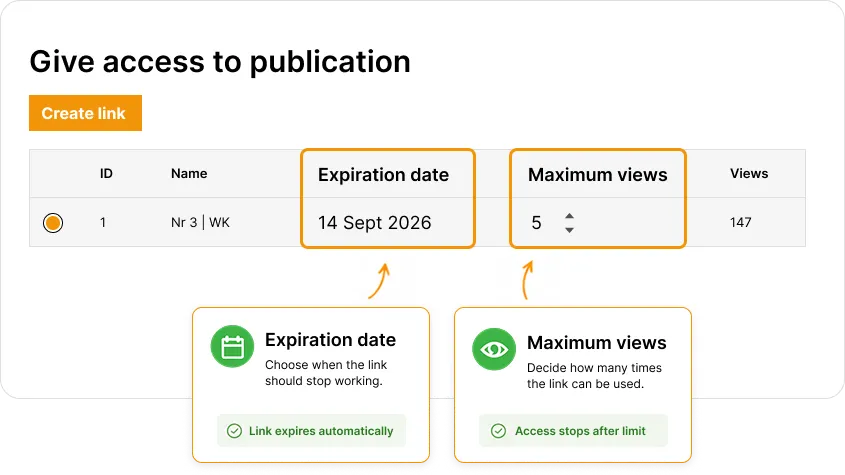
Prenly Workspace also makes it possible to create access links for individual publications. Publishers can control how long a link remains active and limit how many times it can be used – useful for campaigns, previews, collaborations or temporary access.
Manage multiple publications in one environment
For a media group with several newspapers, magazines or niche publications, digital publishing becomes an organizational challenge as much as a technical one.
Each title may have its own brand, readers and editorial team, while the organization still wants common technology and efficient workflows.
Prenly Workspace can manage multiple titles within the same publishing environment.
This makes it particularly relevant for media groups and publishing companies that want to centralize parts of their digital infrastructure while maintaining individual publication identities.
Several titles can also be presented together through digital newsstand experiences, giving readers access to multiple publications within the same app.
Connect Workspace to your existing publishing systems
Moving to a digital publishing platform does not necessarily mean replacing the systems a publisher already relies on.
Prenly can connect with existing editorial platforms, authentication systems, user databases and analytics tools.
Through integrations and APIs, content and data can move between systems while publishers retain established parts of their existing workflow.
PDF and XML files can also be used as part of automated publishing flows, making it possible to transform existing print production into digital editions without rebuilding every publication manually.
For publishers considering a change of platform, getting started with Prenly can therefore involve integrating with existing infrastructure rather than replacing the entire technology stack at once.
Turn print publications into accessible digital experiences
A digital edition should offer more than a static reproduction of the printed page.
Prenly supports alternative reading experiences that can make editorial content easier to consume on different devices and for different reader needs.
Depending on the publication and configuration, readers can move between the traditional page-based newspaper experience and more adaptable article-based reading.
Text-to-speech can make articles available as audio, while adjustable reading modes can improve readability.
Prenly also works with publishers on accessibility and workflows aligned with established accessibility standards. You can read more about accessibility and WCAG in digital publishing.
Use text-to-speech to create another way to consume content
Reading is not always the most convenient way to consume journalism.
People increasingly move between reading, listening and watching content depending on where they are and what they are doing.
Prenly Workspace can support text-to-speech workflows that turn written articles into audio, giving readers another way to access editorial content.
For publishers, that means existing journalism can be made available in another format without producing a separate audio version of every article manually.
Audio can be particularly useful for commuters, multitaskers and readers who benefit from listening instead of reading.
Reach readers with targeted push notifications
Publishing content is only one part of the challenge. Readers also need to discover it.
Prenly Workspace gives publishers tools for sending push notifications and directing readers to specific articles or editions.
Notifications can be used to highlight breaking news, new editions, important stories or other relevant content.
Combined with segmentation, publishers can create more targeted communication rather than sending every notification to every reader.
The goal is not simply to send more notifications, but to make them more relevant.
Understand how readers engage with your content
Digital publishing gives editorial teams access to insights that are difficult to obtain from print alone.
Through analytics and reporting, publishers can follow how readers interact with articles, pages and editions and identify which content creates engagement.
These insights can help publishers understand what audiences actually use – and make more informed decisions about content, product development and reader engagement.
For publishers managing several brands or titles, having comparable digital data across publications can also create a better overview of performance across the organization.
Prenly Workspace and Prenly Reader: what is the difference?
Prenly Workspace and Prenly Reader are two connected parts of the Prenly platform.
Prenly Workspace is where publishers work. It is used to create, organize, manage and publish content, control access, work with integrations and manage the digital publishing workflow.
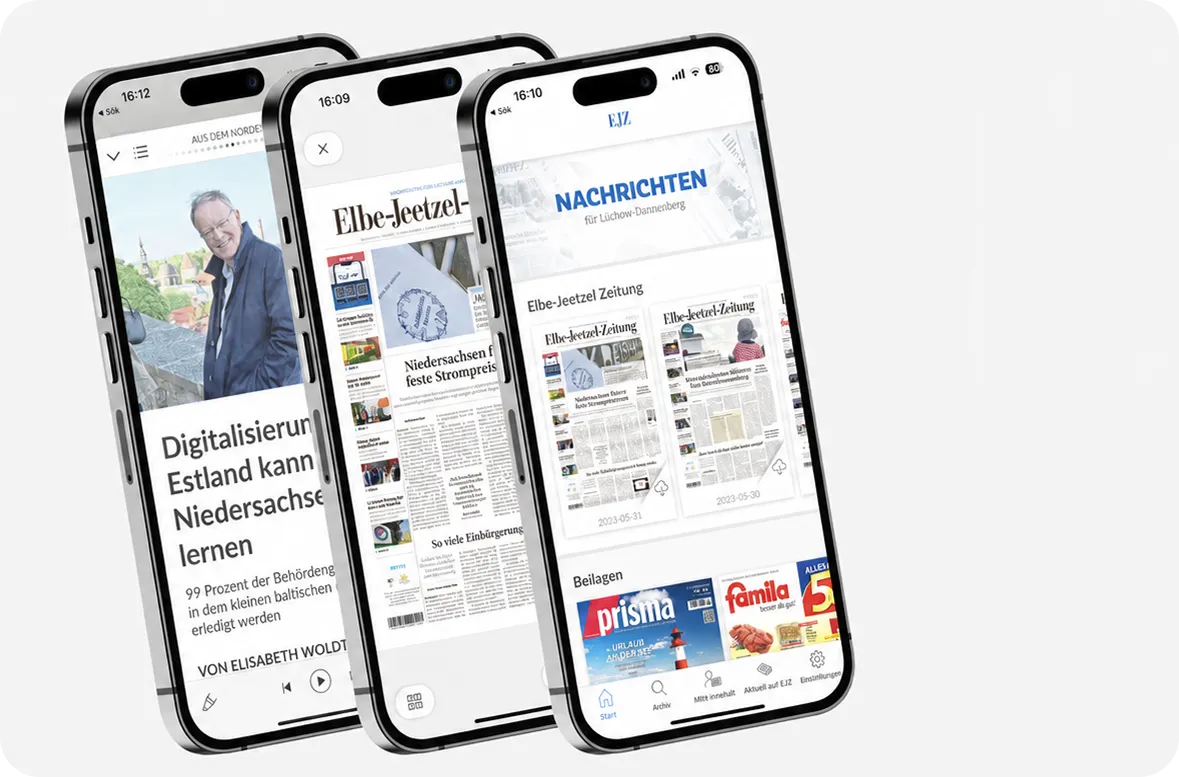
Prenly Reader is where readers experience the content. It brings digital editions, articles, audio, podcasts, games and other content together across iOS, Android and the web.
Together, they connect the publisher's workflow with the reader experience.
Image showing Prenly Reader:
Who is Prenly Workspace built for?
Prenly Workspace is designed for organizations that publish editorial content digitally.
That includes local and regional newspapers, national newspapers, consumer magazines, trade publications, membership publications and larger media groups managing several titles.
The needs may be different, but the underlying challenge is often the same: creating an efficient way to move content from the editorial organization to the reader.
You can explore how Prenly is used by newspaper publishers, magazine publishers and media groups.
Why publishers centralize their digital publishing workflow
As digital publishing develops, publishers often add new tools for apps, e-papers, analytics, audio, notifications, subscriber access and other functionality.
Over time, this can create a fragmented publishing environment.
A centralized publishing workflow can reduce the number of manual steps between systems and make it easier for editorial, product and commercial teams to work with the same digital publication.
Prenly Workspace is designed around that principle: bring the tools needed to manage digital publications together while still allowing publishers to connect the systems they already use.
See how other publishing organizations work with Prenly in our customer stories.
See Prenly Workspace in action
Every publisher has a different combination of content, systems, subscriptions and editorial workflows.
The best way to understand how Prenly Workspace could fit into your organization is to see the platform using a workflow that is relevant to your publications.

