


Other articles by Henrik
-

Games & Quizzes for Newspaper & Magazine Apps | Prenly
19 Aug 2026
We’re launching Prenly Games – a new way for newspapers and magazines to give readers more reasons to open the app and keep coming back.We’re launching Prenly Games – games and quizzes for newspapers and magazines that want to encourage more repeat visits, build stronger reader habits and create new commercial opportunities in their Prenly app.Prenly Games makes it possible to offer games, quizzes and competitions in the same app readers already use. No separate gaming platform or additional account is needed. Give readers more reasons to open the app For many newspapers and magazines, the challenge is not just getting readers to download the app, but creating a habit of opening it regularly. This is where games can play an important role. A daily quiz, a word game or a local competition gives readers a clear reason to come back. Games complement the journalism and can help drive more repeat app visits, build stronger reader habits and increase the perceived value of the subscription. Eight games – directly in the Prenly app Prenly Games includes eight different types of games, ranging from classic quizzes and word games to games where readers identify places or find connections. Guess the Place Number Hunt True or False Word Hunt Quiz Word Master Timeline Connections The games become part of the existing Prenly app and can be adapted to match the publication’s visual identity, with custom colours, icons and ordering. Readers use the same login as in the rest of the app, and features for push notifications and analytics are included from the start. Create local games based on your own news A key part of Prenly Games is the ability to create your own editorial game content. A local newspaper could, for example, create a quiz about the week’s news, ask readers to identify a location in the local area or create questions around a local event. A magazine can build games around its own subject area and audience. Editorial teams can create the content manually or use AI to generate questions and games based on their own editorial material. This makes it possible to quickly turn today’s journalism into a new, interactive format. From today’s news to today’s game Prenly Games is designed to be easy to use as part of the everyday editorial workflow. In the administration tool, editorial teams decide which games should be active, create new rounds and customise the content. A quiz can be created from a news story, a competition can be linked to a current theme and a local game can be published whenever it suits the editorial team. This means games can become part of the daily publishing process – without requiring a separate production workflow. New advertising and sponsorship opportunities Games also create new opportunities for advertising. A game or competition can be linked to a local sponsor, a prize or a commercial theme. Prenly Games supports competitions, leaderboards and automatic winner selection, making it possible to package games as a new offering for advertisers and partners. For publishers, this means the same product can contribute to both reader engagement and new revenue opportunities. Visibility on the web – games in the app Prenly Games can also be used to connect the web experience with the app. The game of the day can be highlighted directly in the website’s news feed or given its own entry point on the news site. The game itself is then played in the Prenly app, where the reader is already logged in as a subscriber. This allows publishers to use their existing web reach to drive more readers to the app. Easy to get started Prenly Games integrates with the existing Prenly app. Prenly helps set up the games section and connect login, push notifications and analytics. You can then adapt the look and editorial tone, choose which games you want to activate and start creating content. The goal is to make the journey from decision to launch as short as possible – without requiring the editorial team to build or maintain its own gaming platform. Want to see Prenly Games in action? At prenlygames.se you can explore the different games and learn more about how Prenly Games works for newspapers and magazines. We’re also hosting a launch webinar where we’ll demonstrate Prenly Games live and show how the product works in practice. Tuesday, 8 September10:00–10:30 Register for the launch webinar →
-

Beyond EPUB: Why Publishers Need Modern E-Paper | Prenly
19 Jun 2026
Many publishers start with a practical search: “convert PDF to EPUB.”It’s a logical starting point. The PDF already exists. The publication is complete. The print workflow is familiar. EPUB seems like the next step because it promises a more flexible reading format for digital screens.But for newspapers, magazines, and media companies, the real opportunity is bigger than changing one file into another. A PDF to EPUB converter changes the file. Prenly transforms the whole reading experience. Prenly is an all-in-one digital publishing platform that helps publishers turn PDF-based editions into branded apps, e-papers, article views, audio experiences, web news, and digital editions built around how readers actually read today. With 45+ years of publishing innovation through Textalk Group, 100% of Swedish daily newspapers choosing Prenly, and more than 2 million readers using Prenly-powered experiences daily, the platform is built for publishers who need more than a format change. They need a better way to publish, distribute, engage, and grow. Why Publishers Search For PDF To EPUB Conversion For print publishers, the PDF is often the most natural place to start. It contains the finished edition. It preserves the layout, images, pages, ads, and editorial structure. It fits into existing production routines and gives teams a reliable output from the print process. The problem is that readers do not experience digital content like print. On a phone, a static PDF can feel heavy. Readers may need to zoom, scroll sideways, and move around the page just to finish an article. That friction matters, especially when subscribers expect a smooth experience in an app or browser. This is why searches around PDF to EPUB and EPUB readers are common. Publishers want their content to work better on screens. They want a more flexible format. They want to make their editions easier to access outside the printed page. That is a useful first question. But it is not the final one. The stronger question is: how can the edition become a digital product that readers return to, not just a file they can open? What A PDF To EPUB Converter Can And Cannot Do A PDF to EPUB converter can help make content more flexible. In some cases, it can improve readability, allow text to reflow, and make the publication easier to open in an EPUB reader. That has value, especially when a publisher wants to move away from a fixed-layout reading experience. But a converter does not solve the wider publishing challenge. It does not give the publication a branded app. It does not create a strong subscriber experience. It does not manage e-paper distribution, push notifications, podcasts, article view, web news, reader analytics, accessibility features, advertising, or subscription workflows. It also does not answer the questions that matter after the file has been converted: How will readers find the edition?How will subscribers access it?How will the experience reflect the publisher’s brand?How will the content support accessibility needs?How will the team understand what readers actually engage with?How will the digital edition support revenue? That is where publishers often outgrow basic conversion tools. The file format matters, but the reading experience around it matters more. Why Digital Editions Need More Than A File Format A strong digital edition should preserve the value of the publication while making it easier to read, navigate, listen to, share, and return to. That is the difference between file conversion and digital publishing. Prenly helps publishers use their existing PDF-based workflows as a starting point, then build a fuller reader experience around them. The edition can still feel familiar to readers who value the print replica, while also offering features that fit modern reading habits. With Prenly, publishers can offer branded apps, e-paper distribution, article view, text-to-speech, accessibility support, web news, podcasts, interactive crosswords, push notifications, and engagement features from one connected platform. For the reader, that means less friction. For the publisher, it means more control over the full digital experience: how content is published, how it is presented, how readers interact with it, and how engagement can be understood over time. This is especially important for publishers that want digital editions to support loyalty, habit, subscription value, and new revenue opportunities. A converted file can be opened. A well-designed digital edition can become part of a reader’s routine. PDF, EPUB, And E-Paper: What Is The Difference? A PDF is a print replica. It is valuable when the goal is to preserve the finished edition exactly as it was designed. Many readers still appreciate this because it keeps the structure of the newspaper or magazine intact, including pages, sections, ads, images, and layout. An EPUB is a flexible reading format. It is designed so content can adapt more easily to different screens and reading systems. This can make long-form text easier to read, especially when layout is less important than flow. An e-paper experience is broader. It can include the print-replica edition, but it can also support article reading, app access, web reading, audio, accessibility, interactive content, notifications, analytics, and revenue workflows. For publishers, the difference is practical. A PDF preserves the edition.An EPUB adapts the content.Prenly helps publishers create a complete digital reading experience around the edition. That is why the best answer is not always to choose between PDF and EPUB. Often, the better path is to make the existing edition work harder across app, web, audio, and engagement channels. How Prenly Helps Publishers Turn PDFs Into Digital Editions Prenly is built for publishers that want to modernize without losing the value of their existing workflow. The PDF can still be the starting point. Editorial and production teams do not need to rebuild their entire process just to give readers a better digital experience. Instead, Prenly helps transform the edition into something more useful, accessible, and engaging. Through Prenly Workspace, publishing teams can manage digital editions, scheduling, distribution, and content workflows in one place. Through Prenly Reader, audiences can access a smoother reading experience across app and web. Readers can browse the e-paper, switch to article view, listen with text-to-speech, discover web news, engage with podcasts or interactive crosswords, and receive notifications that bring them back to relevant content. This is where Prenly’s message becomes concrete: transform your PDF into a modern e-paper. Not by treating the PDF as the final product, but by turning it into the foundation for a stronger digital edition. For publishers reviewing solutions for publishers, this distinction matters. The goal is not only to get content online. The goal is to make the digital edition worth returning to. What Publishers Should Look For Beyond EPUB Conversion When comparing PDF to EPUB tools or EPUB reader options, publishers should look at the whole publishing workflow, not only the output file. A stronger digital setup should support: A branded app and web reading experience E-paper distribution across devices Article view for easier mobile reading Text-to-speech and audio options Accessibility-aware reading features Push notifications and engagement tools Analytics and content insights Subscription, advertising, and revenue workflows One workspace for managing editions, timing, and distribution This does not make EPUB unimportant. It simply puts format in the right place. For a publisher, format is part of the infrastructure. Reader experience is the product. Who This Matters For Local And County Publishers For local and county newspapers, the edition is more than content. It is part of the community. Readers often know the structure of the paper, follow local stories closely, and value the familiar rhythm of each issue. The challenge is to bring that relationship into digital channels without making the experience feel thin or disconnected. Prenly helps county and regional newspapers keep the value of the edition while improving how it works on phones, tablets, and browsers. Article view can make local stories easier to read. Text-to-speech can support readers who prefer to listen. Accessibility features can help more people access the content. Push notifications can bring readers back to important updates, new editions, and local news that matters to them. For local publishers, this is not just a technology upgrade. It is a way to keep local journalism close to readers as habits change. Small And Mid-Sized Publishers Small and mid-sized publishers often need practical digital tools without adding unnecessary complexity. A simple converter may solve one task, but it can leave the team with more systems to manage. One tool for files. Another for the app. Another for analytics. Another for notifications. Another for engagement. That is difficult for teams with limited time and resources. Prenly gives these publishers a more connected way to manage digital editions. Instead of building a custom app or stitching together separate tools, they can publish, distribute, and improve the reader experience from one platform. This helps smaller teams move faster while still offering a professional digital edition under their own brand. Large Media Houses For large publishers and media groups, the challenge is scale. They may manage multiple titles, markets, brands, apps, editions, integrations, and audience segments. A basic conversion tool cannot support that level of operational need. Large media houses need consistency across iOS, Android, and web. They need flexible workflows, analytics, integrations, scheduling, governance, and brand control. Prenly supports publishers that need to manage digital editions across more complex structures. It helps teams bring content, distribution, reader experience, and insight closer together, while still supporting the needs of different titles and audiences. For larger organizations, the value is not only in creating a better edition. It is in building a publishing setup that can scale. Do Not Stop At The File PDF to EPUB conversion can be a helpful first step. It can make content more flexible and give publishers a way to move beyond a fixed print replica. But publishing teams should be careful not to mistake a converted file for a complete digital product. Readers expect more now. They want easy navigation, readable articles, audio options, accessible formats, relevant notifications, interactive content, and a digital experience that feels connected to the publication they trust. Prenly helps newspapers, magazines, and media companies build that experience from the PDF outward. With 45+ years of innovation through Textalk Group, adoption by 100% of Swedish daily newspapers, and more than 2 million daily readers, Prenly gives publishers a proven way to turn print-based workflows into digital editions designed for real audience habits. Want to transform your PDF into a modern e-paper? Book a free demo with Prenly. FAQ Is EPUB The Same As An E-Paper? No. EPUB is a digital file format that helps content adapt to different reading systems. An e-paper is a broader publishing experience that can include a branded app, web reading, article view, audio, accessibility features, analytics, and reader engagement tools. Can Publishers Convert A PDF Into A Mobile-Friendly Edition? Yes. Publishers can make PDF content easier to read on mobile by converting or restructuring it for digital use. But a strong mobile edition also needs good navigation, article view, app or web access, accessibility support, and engagement features. Why Is A PDF Alone Not Enough For Digital Readers? A PDF preserves the print layout, but it can be difficult to read on smaller screens. Readers often need to zoom and move around the page. A better digital edition keeps the value of the publication while making the content easier to read, listen to, and navigate. What Should Publishers Look For Beyond PDF To EPUB Conversion? Publishers should look for branded app support, web reading, article view, accessibility features, text-to-speech, push notifications, analytics, subscription support, advertising options, and a publishing workspace that fits their team’s workflow. How Does Prenly Help Publishers Transform PDFs Into Digital Editions? Prenly helps publishers use PDFs as the starting point for richer digital editions. The platform supports e-paper, branded apps, article view, text-to-speech, web news, podcasts, interactive content, accessibility features, and reader engagement tools.
-

WAN-IFRA Congress 2026 for Publishers | AI, Reader Revenue & Digital Publishing
22 May 2026
WAN-IFRA Congress 2026, officially the 77th World News Media Congress, will take place June 1–3, 2026, at Palais du Pharo in Marseille, France.You can explore the official event website and programme here: WAN-IFRA Congress 2026 Official Programme This year’s event brings together publishers, editors, product leaders, and media executives to discuss some of the biggest topics shaping the future of journalism – including AI in media, reader revenue, audience engagement, digital publishing strategies, and sustainable business models.For publishers looking to modernize the digital news experience, strengthen audience relationships, and explore new opportunities in AI-driven publishing, WAN-IFRA Congress 2026 is one of the most relevant international events of the year.Prenly will be attending the congress throughout the week. Davida and Rasmus from Prenly will be available for meetings with publishers, partners, and media organizations interested in the future of digital newspapers, e-paper experiences, accessibility, and reader engagement. Why WAN-IFRA Congress 2026 stands out this year The World News Media Congress is widely recognized as one of the leading global events for the news media industry. Every year, it gathers publishers and media leaders from more than 60 countries to discuss the biggest challenges and opportunities shaping journalism today. This year’s agenda focuses heavily on: AI in media and publishing Audience engagement and retention Reader revenue strategies Digital product innovation Accessibility and user experience Sustainable business models for publishers Trust in journalism and future newsroom strategies The conference also includes the World Editors Summit, Digital Media Awards Worldwide, and a wide range of workshops, networking sessions, and product discussions.For publishers navigating rapid technological change, WAN-IFRA offers a valuable opportunity to learn directly from some of the world’s most influential media organizations and explore how the industry is responding to AI, changing reader expectations, and new business models. What will be discussed in Marseille The 2026 speaker lineup includes leaders from organizations such as: The New York Times The Guardian Dow Jones / The Wall Street Journal Le Monde Mistral AI The European Commission Several sessions are especially relevant for publishers focused on digital experiences and AI-driven product development.Topics include: How AI is changing audience behavior The future of digital publishing products AI-powered news experiences Reader loyalty and subscription growth Data-driven product decisions Accessibility and inclusive journalism Monetization beyond traditional subscriptions There will also be dedicated discussions around how publishers can compete and grow in an increasingly AI-driven content landscape. Where Prenly fits into the future of digital publishing The themes of WAN-IFRA Congress 2026 align closely with the challenges publishers are solving every day – and with the solutions Prenly helps deliver. Prenly enables publishers to modernize and strengthen the digital newspaper experience by bringing together: E-papers Digital editions Audio experiences Podcasts Web content Analytics Advertising opportunities Reader engagement tools all within one unified platform. With Prenly Reader and Prenly Workspace, publishers can create accessible, modern, and reader-focused digital experiences across web, iOS, and Android. Features such as: AI-powered text-to-speech Accessible reading modes Push notifications Offline reading Multi-title publishing Digital archives Reader analytics Single issue sales help publishers improve both audience engagement and long-term revenue opportunities. At a conference where AI, accessibility, product innovation, and reader revenue dominate the agenda, Prenly is highly relevant to the conversations happening in Marseille. Modernizing the digital newspaper experience Today’s publishers face increasing pressure to balance: Product quality Reader expectations Accessibility requirements Revenue growth Operational efficiency At the same time, many organizations want to modernize without rebuilding their entire publishing infrastructure from scratch.That is where Prenly stands out.Prenly integrates into existing publishing workflows and helps publishers launch modern digital newspaper experiences quickly – while maintaining full control over branding, content, subscriptions, and reader relationships.For publishers attending WAN-IFRA Congress 2026, this creates an opportunity to explore practical, scalable approaches to digital publishing modernization. Meet Prenly at WAN-IFRA Congress 2026 Davida and Rasmus from Prenly will be attending WAN-IFRA Congress 2026 in Marseille throughout the event. If you would like to discuss: Digital newspaper strategies E-paper modernization AI-powered audio experiences Reader engagement Accessibility Audience growth Revenue opportunities you are welcome to connect with them directly on LinkedIn to schedule a meeting during the congress. Attending WAN-IFRA Congress 2026? Reach out to Davida Rothman or Rasmus Rune on LinkedIn to book a meeting with Prenly in Marseille. FAQ What is WAN-IFRA Congress 2026? WAN-IFRA Congress 2026 is one of the world’s leading conferences for publishers, editors, media executives, and digital news leaders. The event takes place June 1–3, 2026, in Marseille, France. Why is WAN-IFRA important for publishers? The conference focuses on the future of journalism, AI in media, audience growth, reader revenue, digital products, and sustainable publishing business models. Will Prenly attend WAN-IFRA Congress 2026? Yes. Prenly will attend WAN-IFRA Congress 2026 in Marseille to meet publishers and discuss digital newspaper experiences, e-paper strategy, accessibility, audio, and audience engagement. Who from Prenly will be there? Davida and Rasmus from Prenly will be on site throughout the conference. Publishers and partners are welcome to connect with them on LinkedIn to schedule meetings during the event. What does Prenly offer publishers? Prenly helps publishers modernize their digital newspaper experience with apps, e-papers, AI-powered audio, accessibility features, analytics, reader engagement tools, and audience-focused reading experiences. Where is WAN-IFRA Congress 2026 held? WAN-IFRA Congress 2026 takes place at Palais du Pharo in Marseille, France. What topics will be discussed at WAN-IFRA Congress 2026? Main topics include AI in media, digital publishing, audience engagement, subscriptions, accessibility, reader revenue, product innovation, and the future of journalism.
-

MVFP Future Media 2026: AI & Publishing Trends
25 Feb 2026
On February 19, 2026, media leaders gathered in Berlin for MVFP Future Media Now 2026 – a conference centered around one dominant theme: AI and its impact on the future of publishing.Across keynotes and panel discussions, it became clear that artificial intelligence is no longer a future topic. It is already reshaping how content is produced, distributed, discovered, and monetized. Is AI reshaping the publishing landscape? Several sessions focused on the very real challenges AI creates for publishers: AI bots crawling content at scale AI-generated search overviews reducing click-through rates Increased pressure on visibility and traffic The risk of revenue erosion At the same time, speakers emphasized that AI adoption alone does not guarantee improvement. Poorly implemented AI initiatives can create operational complexity without strengthening the underlying business model. The message from MVFP Future Media Now 2026 was clear: AI must serve a sustainable revenue strategy – not replace one. Future of money: Revenue must be resilient Alongside AI discussions, the “Future of Money” theme addressed how publishers can build resilient revenue streams in an increasingly unpredictable market.Diversification, new audience segments, and subscription-based models were central to the conversation. As traffic becomes less predictable, direct reader relationships and recurring revenue are becoming even more critical. For subscription-driven publishers, this means focusing on: Conversion optimization Strong onboarding experiences Retention and lifecycle communication Operational efficiency across systems From AI pressure to subscription strength If AI reduces traffic and visibility, publishers must rely more on owned relationships and subscription revenue. This is where infrastructure becomes crucial.At Prenly, we see how optimized subscription management, system integration, and structured onboarding can help publishers strengthen recurring revenue – regardless of external platform changes. MVFP Future Media Now 2026 reinforced an important reality: The future of digital publishing will not be defined by AI alone, but by how well publishers connect technology to sustainable monetization.Learn more about MVFP Future Media Now here@Ravi Sen Gupta and @Esther Dietzsch from Prenly at MVFP Future Media Now 2026 in Berlin
-

Apple | Request Access to AppStore Connect API
24 Oct 2025
To provide your customers with the best possible reading experience, we want to continuously improve and update your mobile apps. In order for us to do so, please follow the instructions below. Step 1. Log in to your Apple developer account as an account holder by visiting https://developer.apple.com/account/ Select "Users and Access " in the "Program Resources" section. Log in to Developer account and select "Users and Access". Log in to your Developer account and select "Users and Access". Step 2. Select "Integrations" and then click "Request Access " to activate the App Store Connect API. Select "Request Access" to get access to the App Store Connect API." Select "Request Access" to get access to the App Store Connect API. Step 3. Read through the request, check the confirmation box, and then select "Submit". "Submit" Read through the request, check the confirmation box, and then select "Submit" You have now activated the App Store Connect API and we will now take care of the rest. We thank you very much!
-
Google | Create a Play Console Payments Profile - to manage and track your app sales
24 Oct 2025
1. Sign in to Play Console. 2. Go to the Payments settings page (Setup > Payments profile). 3. Click Create payments profile. Make sure to have your business information available. 4. Under "Payments profile," click the down arrow and select Create payments profile. 5. Name and address: - Enter the legal name of your business as you want it to appear on your payments profile. This information will be shown to your customers and also on your receipts. - Provide your legal business address as it appears on official documents. It’s important that Google has a valid physical address on file for your business. PO box address is not allowed. 6. Primary contact: Enter the name of an authorized representative for your company who Google can contact if they have questions about your payments profile. Provide an email address and a phone number (optional). 7. Enter the following public business information, or choose to match your public merchant profile and payments profile information:- Enter your business website.- Select the category of products that you sell.- Your customer support email.- The business/product name that'll appear on your customers' credit card statements. Note: To help customers remember what they purchased and keep chargebacks to a minimum for you, use an appropriate credit card statement name. 8. When you're finished, click Submit.Note: You cannot change your business location country but you can change your public merchant and payments profiles later. After you create a payments profile it is automatically linked to your Play Console. Note: If you have set up a payments profile or merchant center account previously, it is already linked to your Play Console. Reference: https://support.google.com/googleplay/android-developer/answer/7161426?hl=en Add your bank account https://support.google.com/paymentscenter/answer/7161440?hl=en
-

Apple | Renew membership
24 Oct 2025
An active membership grants you access to all resources. An expired Apple Developer Program membership will have the published apps automatically deactivated from App Store by Apple, so your readers can no longer find and download the app. Apple will remind you 30 days prior to your annual membership to Apple Developer Program expiring on the e-mail address associated with the account holder. To renew the membership you will need access to the account holder's AppleID (an e-mail address, password, and two-factor authentication) and your payment information. The most common payment method is by credit card. Step 1. Sign in to your Apple Developer account as the account holder by visiting https://developer.apple.com/account/. You may also visit https://developer.apple.com/ and select Account in the menu. Sign in to Apple Developer. Step 2. At the top of the Apple Developer overview, you will see a message regarding your membership status if it has expired. See the section Your Apple Developer Program membership has expired. In it, you will be guided by Apple as the account holder on how to renew your membership. Follow the instructions provided by Apple in this section. Find current membership expiration date You will find your current membership expiration date in the section Membership details. You can "jump" to the section by selecting the section shortcut "Membership details" at the top of the overview page. Select "Membership details" to jump to the section "Membership details". In the section Membership details, you will find details about your membership such as the Team ID, type of membership, who the current account holder is, and the membership expiration date by the label Renewal date. Your membership will expire past this date unless you renew your membership before the date, or opt-in for automatic membership renewal. Your membership expiration date is on the row labelled by "Renewal date". Automatic membership renewal You (the account holder) may opt-in for automatic membership renewal by toggling the Auto-renew option in the Membership details section. If you have opt-int for the automatic membership renewal then Apple will charge your default payment method on your membership expiration date.
-

Apple | Activate Speech synthesis
24 Oct 2025
Prenly supports speech synthesis of articles in the simplified article reading mode. This can be used to have the iOS app read the article content out loud. You can at any time in the article reading mode choose to activate or deactivate the speech synthesis functionality. 1. Select an article in the article reading mode. If your publication opens to a replica, select an article from the replica to open in the simplified article reading mode. Open the article mode. 2. Activate the speech synthesis functionality by selecting "Aa" in the top-right corner. The article reading mode's settings will appear. Select the panel "Theme & Speech" and then toggle the switch for Speech synthesis. The toggle will change to colour to indicate that the speech synthesis function shall activate. Activate the speech synthesis functionality within the Aa-menu and the panel "Theme & Speech". Article reading mode with deactivated speech synthesis functionality. 3. Deactivate the speech synthesis functionality by selecting "Aa" in the top-right corner. Select the panel "Theme & Speech" and then toggle the switch for Speech synthesis. The toggle will become colourless to indicate that the speech synthesis functionality shall deactivate. Deactivate the speech synthesis functionality within the Aa-menu and the panel "Theme & Speech". You will find three icons at the bottom of the article when the speech synthesis functionality is activated. Select the play icon, located in the middle of the three, to have the article read out loud via the speech synthesis. While the reading is active the same icon will transform into a pause icon, enabling you to pause the reading. Switch article by either swiping or selecting the previous- and next icons. If the speech synthesis is currently reading it will instead read the new selected article. Article reading mode with activated speech synthesis functionality. Select the video below to see how to activate or deactivate the speech synthesis functionality.
-

Apple | Create deployment key
24 Oct 2025
This guide will guide you through easy-to-follow instructions to create a deployment key for the iOS-application within Prenly. You need to sign in as the account holder to follow these steps. Step 1. Sign in to your Apple developer account as the account holder by visiting https://developer.apple.com/account/ Select Users and Access in the section Program resources. Log in to Developer account and select "Users and Access". Step 2. Select Integrations. Select "Integrations". Step 3. Select Request Access to enable the App Store Connect API. Select "Request Access". Step 4. Read through the request, check the confirmation box and then select Submit. Accept the agreement and request API access. Step 5. Notify Prenly that you are done by sending an e-mail to hello@prenly.com.
-
Google | Change Account Owner
24 Oct 2025
Currently, Google does not permit changing the account owner for the Play developer account. The developer account will always be associated with the Google account used when the Play developer account was created. In some circumstances, you can change the e-mail address associated with the Google account. For details, see Google's manual Change the email address for your account. Alternatively, you can create a new Play developer account with a different Google account and then make an app transfer of the selected app. Transfer app to a different developer account If you have apps that you want to transfer to a different Google Play developer account, you can submit a transfer request. For details, see Google's manual Transfer apps to a different developer account.
-

Add CTAs to your articles
24 Oct 2025
What is this? CTA (Call-to-Action) links let you add clickable icons or buttons on top of the content in your PDF boxes for your non-editorial content, such as ads, crossword puzzles, etc. CTA links improve the visibility of your interactive content—such as links, videos, and slideshows—in your e-newspaper. All you need to do is add a few extra parameters to the URLs you currently use to create hyperlinks in your PDFs. To help you add these parameters, we’ve created a link generator as a premium service, where you can easily build the correct link structure. Regarding the frame of the link boxes, contact support to ask us to set a default option in replica mode. You can choose between visible, hidden, or fading out after a short while. We can also set your desired color as the default. Build your links easily with our link generator With our link generator at ctabtn.com, you can: -Create visually appealing links with icons-Choose from different sizes: small, medium, large- Place the link anywhere on the page-Customize colors for the icon, background, and border-Add custom or predefined labels-Track clicks and views on your links With an account, you also get access to an Interstitial Ads tool to manage content and create code that’s easy to paste into Prenly Admin. Sign up for an account and you’ll get: - An unlimited number of interstitial ads- Unlimited number of CTA buttons with tracking- Image and video hosting included- Statistics by campaign and month- Email reports, immediate or scheduled- 100 GB of data traffic per month includedPrice: 500 SEK/month Learn more about our service How to build your URLs manually To manually create a URL with CTA functionality, start with your base URL and then add the parameters using ? followed by parameter=value. Separate multiple parameters with &. Basic format https://din-url.com?parameter1=värde1&parameter2=värde2 Available parameters Required parameters prbe-cta-icon: Selectan icon: "none", "link", "video", or "slideshow".prbe-cta-size: Selectsize: "small", "medium", or "large". prbe-cta-pos: Select position: "top-left", "top-center", "top-right""middle-left", "middle-center", "middle-right""bottom-left", "bottom-center", "bottom-right" prbe-cta-clr: Icon color(hexadecimal, e.g., %23FFFFFF for white) prbe-cta-bg-clr: Background color(hexadecimal, e.g., %23000000 for black) prbe-bor-vis: Show border: "0" (no border) or "1" (show border)You can also use this parameter if you want to hide the dashed border around the clickable area without using the button functionality. Optional parameters prbe-cta-label: Text displayed next to the icon (max 15 characters) prbe-bor-clr: Border color (hexadecimal, used only if prbe-bor-vis=1) Example Here is a complete example of a URL with all parameters: https://example.com/?prbe-cta-icon=link&prbe-cta-size=large&prbe-cta-pos=top-center&prbe-cta-clr=%23F0F0F0&prbe-cta-bor-clr=%23AA0000&prbe-cta-bg-clr=%23000000 Important to keep in mind - All hexadecimal color codes and special characters must be URL-encoded (e.g., # becomes %23).- Spaces in labels must be URL-encoded to %20.- Special characters must be URL-encoded according to URL standards.- For logged-in users, the "original-url" parameter is automatically added to enable tracking of views in external systems.- This feature requires at least version 13.8 for iOS and 12.7 for Android Default Values If you omit any parameters, these default values are used: - Icon: "none"- Size: "medium"- Position: "middle-center"- Icon color: #FFFFFF (white)- Background color: #000000 (black)- Border: None (0)- Border color: #FFAE00 (if border is enabled) Video Add the link to your content Once you’ve created the link, copy it and paste it into your content the same way you add links today. See the guide: Annotate a link in a Webarch-imported issue Need help? If you have any questions or need assistance getting started, please don’t hesitate to contact us at hello@prenly.com
-

My Profile
24 Oct 2025
In Prenly Workspace you can also manage your profile for the tool.Start by logging in to: content.textalk.se Then click on your name in the upper right corner, and a drop-down menu will appear. Click on My Profile to make changes. Here you can change settings such as, email address, first and last name, add phone number or username. When you are satisfied with the change, just click Save at the top right. Under the My Profile menu there is also the Change password function and the possibility to change the language for Prenly Workspace. Currently English & Swedish are supported.
-
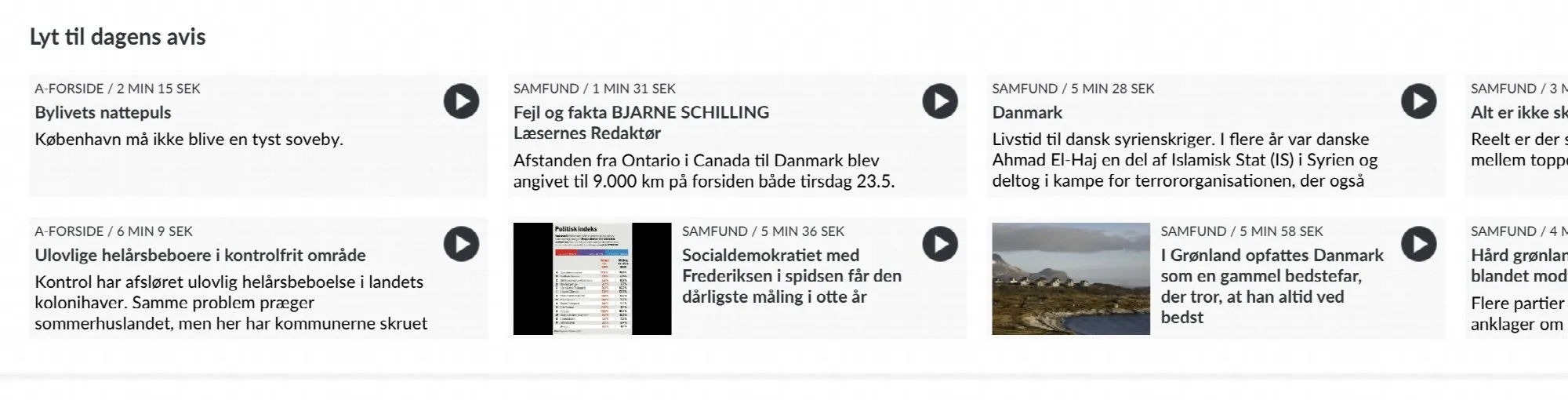
Display articles on front page
24 Oct 2025
The article component allows you to show the visitor more content from the newspaper, giving your visitors the opportunity to discover articles in more ways than by browsing the e-paper.If there are audio files linked to the articles, visitors can have the article read out directly from the home page. The audio can continue to be read while you navigate around the e-magazine.A live example of what the article component looks like can be found on the Danish newspaper Politiken.How to create an article componentGo to Prenly Workspace .Select application.Select "Start page".Scroll to the bottom and select "Add component".Select "Articles".Enter a name (only displayed internally in Prenly Workspace).Select Source. First the title from which you want to display articles.Then Publication. If you select "Latest publication", the articles from your latest edition will always be displayed. But you can also select a specific issue.In the filter menu, you can filter which types of articles you want the component to display. You can choose from the following options: 1) Article audio – You can choose to display either articles that have an attached audio file or articles that do not have an audio file. 2) Articles with more words than – You select how many words an article must contain to appear in the article component. All text in the article, including the vignette, will be counted as words. (Note that the word count is automatically applied only to publications imported to Prenly after 2025-02-26. If you need help with older publications, the Prenly support team can assist you). 3) Article images – You can choose to display either articles that contain images or only articles without images.At Content you can give the component a Title and Description.Further down in the component setting, you can select labels and choose settings for article audio.Then comes the Appearance settings, where you can adjust the colours of the different parts of the component.And at the very bottom you can choose if you want to show the component only in certain platforms and only during certain times.Once you have finalised your settings and saved, you can drag the component to any position on the homepage. Activate the component and publish the page.The article component will be displayed on the home page.At the time of writing (May 24, 2023), the component is displayed in the web browser and the iOS app, but not yet in the Android app.Article audio in the form of mp3 files has higher quality than the built-in speech synthesiser and in May 2023 it is only available in the Politiken e-journal. An integration with a speech server that can receive texts and create mp3 files is required.We will work to create a solution that is integrated with Prenly but more on that later.
-

Platform-specific components
24 Oct 2025
You can decide on which platforms a component should be displayed. For example, if you want to create a special component that only appears in the web version of the e-magazine, and another that appears only in the iOS app or the Android app. This feature makes it possible to create banners and editions that are specially adapted to a specific target group. Here we show you how to do it. Select "Applications", the desired application and then "Add component". Select a component of your choice. In this example we chose "Carousel." The platform setting is located at the bottom of each component. Scroll to the bottom of the settings window. Uncheck the platforms in which you do not want to display the component and select "Update".
-

Create a digital publication
24 Oct 2025
Our digital e-magazine platform offers an efficient and engaging way to distribute content to your readers.Here we will guide you through how to create a digital publication in Prenly from scratch.1. Log inFirst of all, you need to have an account with editor role in Prenly Workspace. Then log in via this page: https://content.textalk.se2. Start creating- From the left menu select "Titles" followed by the title you wish to create your new publication.Contact support if you need help creating a brand new digital title.- Then select the orange Create Publication button to start creating your digital publication. If you are on a smaller device, select "+". Create publicationEnter a name for your new publication, a publication date, and the required read permissions.Tags are used for special packages, read more about how it works here.Click Create.3. Adding articlesNow is the time to start filling our new digital publication with articles. You can either create brand new articles or copy from existing publications using article mode.Create new article- Select the articles tab and click the button New Content > New Article- Enter the title and text and add any images or videos. Format text paragraphs by clicking the format selector to the left of the text block. Format textSee also this guide that describes more about how to write in Prenly.- When you are finished with your article, you need to change the status from Draft to Approved in the menu in the upper right corner. It is also possible to click in the empty circle to the left of the article's name in the articles tab so that it turns green, which also sets the article to approved status. ApprovedCopy an article from an existing publication- Select a publication that contains the article you want to copy to your digital publication.- In the Articles tab, highlight the article by clicking on it.Keep in mind that not all releases need to have articles.- Click on the three-dot menu in the upper right corner and select Copy.- Select the title you want to copy this article to, in this case our supplement "Extra digital". Also choose which edition and section. If all choices are filled in and the article can be copied, the Copy button will appear. Copy an article 4. Create section pageUnder the articles tab and the blue New Content button, you can also choose to create a section page. It is a selection of templates for a layout page with different numbers of columns and rows in blocks that you can use, for example, to create a front page. LayoutYou can upload a logo, change colors, create puffs, display dates, etcWhen you are finished with your section page, set it as approved according to previous instructions.5. Publish editionNow is the time to publish this new publication. Click the green Publish button below the articles and go through all the steps:Name version: Ex version 1Choose cover image: Choose between standard image (a blank front page), a section page (if you created one) or upload an image for your own cover.Enter publication date and time: Choose between Now or scheduleWhat should the publication contain: Mark the articles to be included by marking the circle so that it turns orange.Write a description: Optional. This text becomes visible if you use a so-called notice or hero component to display the publication on the start page.When all the steps above are clearly marked, you are also ready to publish - click the green button Publish now.If you have chosen a date further in the future, click on Schedule for publication. Publish now6. Add the publication to your homepageThe last thing we do is present our new publication on our home page so it becomes available to all readers.Click on your application in the menu and go to application settings. Add the new title. See also our application settings guide.Open the home page and create a new block with, for example, a Carousel or Hero to display the publication. Read more in our guide on how to build your startpage.Save and publish!
-

Annotate link in Prenly
24 Oct 2025
Adding a URL link to an article is easy. Let us show you how! 1. Log in to Prenly Workspace; https://content.textalk.se 2. In the Titles menu, select the issue you want to edit. 3. Inside the issue, make sure that you have selected Articles in the menu on the left and not Pages. 4. In the menu on the right, change the edition from Approved to Draft. 5. Select the text, sentence or URL link to be annotated and then right-click and a new menu will appear above the text. Click on the chain icon. 6. In the box Link under the URL menu, insert the link you want to annotate. To save, click OK. 7. When you have saved the text, sentence or link you annotated, it will change colour to blue, which is the correct behaviour. Ps. When you annotate in the Prenly editor, the links become clickable in "article reading mode" and not in PDF mode. 8. And as the last step, do not forget to change the article to Approved instead of Draft and then click on the green button to publish or schedule publication! ?