


Other articles by Fastén
-
Set up IP Access for Location-Based Reading
27 Jul 2026
An IP-based subscription allows readers to access your content without logging in, as long as they are connected to a predefined IP address or IP range. Instead of verifying a user account, Prenly checks the reader’s network location and automatically grants access. What is it used for? IP-based subscriptions are useful when multiple people should be able to access your content from the same location without creating individual user accounts. Common use cases include: Libraries Schools and universities Offices and newsrooms Hotels and other public spaces Because access is based on the network rather than individual accounts, there is no limit to the number of readers who can access the content at the same time from an approved IP address. How is it implemented? To activate an IP-based subscription, simply send us the IP address or IP range that should be granted access. Once we receive the information, we will: Configure the IP address in Prenly. Connect the appropriate subscription package(s). Activate access for the specified network. After the setup is complete, readers connected to the approved network can access the included content without signing in. Be aware: Access is only available while the reader is connected to an approved network. If they leave the network, access is removed until they reconnect. There is no limit to the number of simultaneous users connected from an approved IP address or IP range. If you would like to activate IP-based subscriptions, have questions about the setup, or would like pricing information, please contact hello@prenly.com.
-
Webarch – PDF Technical Specification
15 Jul 2026
Guidelines for Uploading PDF FilesCreated: 2026-07-15This document describes the recommended specifications for PDF files uploaded to the Webarch system. Following these guidelines ensures optimal rendering, text extraction, archiving compatibility, and the best possible reading experience.1. Recommended PDF StandardWe strongly recommend exporting files using one of the following formats.Preferred formatsPDF/A-2BPDF/A-2UThese formats ensure that all required resources are embedded in the document and that the file remains compatible for long-term archiving and processing.Alternative supported formatsPDF/A-1BPDF/X-3Recommendation: Whenever possible, use PDF/A-2B or PDF/A-2U.2. PDF VersionRecommended PDF version:PDF 1.7This version provides full compatibility with modern PDF processing engines and ensures correct handling of:TransparencyFontsMetadata3. Archival Format (PDF/A)Files should preferably be exported using a PDF/A archival format.Benefits of PDF/AAll fonts are embeddedColor profiles are includedNo external dependenciesConsistent rendering across systemsLong-term preservationUsing PDF/A significantly improves the stability of Webarch's text extraction and page rendering.4. Font RequirementsAll fonts must be embedded in the PDF.Additionally:Fonts should contain proper Unicode mappings.Avoid subset fonts with incorrect character encoding.Incorrect font mappings may prevent proper text extraction.If fonts are incorrectly mapped, OCR may be required to extract text.5. Compression and OptimizationAvoid uploading heavily optimized or pre-compressed PDFs.Over-optimized PDFs can introduce rendering problems and reduce processing quality.Common issues caused by excessive compressionVisible lines between images or page elementsRendering artifacts in gradients or transparent objectsReduced image qualityBroken layers or flattened contentFor example, browsers such as Google Chrome may display visible lines around images when rendering heavily compressed PDFs.Recommendation: Do not optimize the PDF for web delivery before uploading it to Webarch.6. Image QualityRecommended settings:Use print-quality images whenever possible.Avoid unnecessary downscaling.Avoid aggressive image compression.Print-ready PDFs are generally ideal for Webarch.In most cases, the same PDF used for professional printing is also suitable for Webarch ingestion.7. Best PracticesFor the most reliable processing:Export directly from the original layout software (e.g. Adobe InDesign).Use a standard PDF/A export profile.Avoid manual post-processing or third-party PDF optimization tools.Ensure fonts and ICC color profiles are embedded.Validate the PDF using a PDF/A validator when available.8. Recommended Settings SummarySettingRecommendationFormatPDF/A-2B or PDF/A-2UPDF VersionPDF 1.7FontsFully embedded with proper Unicode mappingCompressionAvoid heavy optimization or web compressionTransparencyPreserve transparency; do not flatten unless requiredSource FilePrefer original print-ready production PDFsRecommended WorkflowCreate the PDF directly from the original layout application.Export using PDF/A-2B or PDF/A-2U.Verify that fonts are embedded.Avoid additional optimization or compression.Upload the original print-quality PDF to Webarch.
-

Print vs Digital vs Hybrid Publishing: What Works Best?
10 Jun 2026
Publishers are no longer making a simple choice between print and digital. The stronger question is how each format supports the reader relationship, the business model, and the editorial workflow.Print still matters for many audiences. A printed newspaper or magazine can carry trust, routine, local presence, and premium value. At the same time, digital publishing has become essential for reach, accessibility, mobile reading, engagement, and reader data.
-

How to Publish a Magazine: A Step-by-Step Guide for Modern Publishers | Prenly
8 Jun 2026
Publishing a magazine today is not only about producing a printed issue. Modern publishers need to plan content, design a strong reading experience, distribute across print and digital channels, engage readers after publication, and understand what keeps audiences coming back.Print can still be valuable, especially for loyal readers and premium formats. But digital reading is now central to how audiences consume media. Pew Research Center reports that 86% of U.S. adults get news at least sometimes from digital devices, while only 7% often get news from printed newspapers or magazines.For magazine publishers, this means the publishing process needs to support both the edition experience and the modern digital journey. A magazine may now exist as print, e-paper, app content, web edition, article view, audio, newsletter links, and social sharing.Prenly is an all-in-one digital publishing platform for newspapers, magazines, and media companies. It helps publishers create modern digital editions, improve reader experience, and manage digital publishing workflows across app, web, and e-paper formats. What Does It Mean to Publish a Magazine Today? To publish a magazine today means creating a complete editorial product and making it available in the formats your audience actually uses. That may include: A printed magazine A digital edition or e-paper A web edition A mobile app Article-based reading Audio or text-to-speech Special editions Newsletter and social distribution A regional magazine publisher, for example, may release a monthly print issue while also offering a digital edition, mobile article view, audio versions of selected stories, and push notifications for selected features. The goal is no longer just to publish an issue. The goal is to create a magazine experience that readers can find, read, share, return to, and value over time. Step 1: Define Your Magazine Concept and Audience Every strong magazine starts with a clear editorial idea. Before planning the first issue, define who the magazine is for, what reader need it serves, what topics it will cover, how often it will publish, and how it will create business value. A local lifestyle magazine may focus on community, events, food, culture, and interviews. A trade magazine may focus on industry insight, expert commentary, and member value. A publisher with multiple titles may need a repeatable structure that works across several brands and audiences. Clarity at this stage helps shape the editorial calendar, design direction, pricing model, advertising offer, and modern publishing workflow. Step 2: Build an Editorial Plan A magazine needs more than a collection of articles. It needs structure. Your editorial plan should include: Issue theme Feature articles Recurring sections Interviews Columns Visual stories Advertiser or partner content Digital-only extras Production deadlines Review and approval steps This gives the team a reliable process and gives readers a familiar experience from issue to issue. Many publishers now use hybrid publishing models where one editorial workflow supports print, e-paper, websites, and mobile apps. This makes planning more important because content may need to work in several formats instead of only one printed layout. For local and regional publishers, this can also help maintain a strong community identity while making content easier to access across digital channels. Publishers serving local communities may benefit from a setup designed for county and regional papers. Step 3: Choose the Right Publishing Model Most magazine publishers choose one of three models: print-only, digital-only, or hybrid. Print-only publishing can work for highly traditional audiences or premium physical editions, but it limits digital reach and reader data. Digital-only publishing can reduce physical distribution needs and create more flexibility, but it requires a strong digital engagement strategy. Hybrid publishing is often the most practical model for established publishers. It preserves the value of the magazine issue while opening new ways to reach readers through digital editions, e-paper, newsletters, app content, and web experiences. The right model depends on the audience, revenue strategy, production resources, and how readers prefer to consume the magazine. Step 4: Prepare Content and Design for Real Reading Behavior Magazine design should support both editorial identity and readability. For print, this means strong layout, typography, imagery, pacing, and visual hierarchy. For digital, it also means making the content easy to read on phones, tablets, and desktops. A good digital magazine experience should include clear headings, readable paragraphs, strong image quality, logical article structure, mobile-friendly navigation, and easy movement between sections. It should also support accessibility. The World Health Organization estimates that 1.3 billion people experience significant disability worldwide. For publishers, features such as adjustable text size, clear structure, and text-to-speech can make magazine content easier to access for more readers. Accessibility should not be treated as an afterthought. Publishers that want to make digital content easier to use can benefit from clear guidance around WCAG guidelines and accessible reading experiences. Step 5: Select a Digital Magazine Platform A digital magazine platform helps publishers move from a static issue to a fuller reader experience. When evaluating a platform, look for support for: Digital editions and e-paper Branded app experiences Web editions iOS, Android, and web publishing Article view PDF or editorial system workflows Scheduling and staged publishing Push notifications Sharing and deep links Text-to-speech and audio Digital advertising Single issue sales Reader analytics Integrations with existing systems This is where Prenly Workspace fits into the publishing process. It helps publishers manage digital editions, content workflows, app structure, publishing settings, and distribution from one connected workspace. The goal is not just to upload a PDF. The goal is to create a connected experience where readers can open, read, listen, save, share, and return. Step 6: Publish and Distribute Across the Right Channels Once the magazine is ready, distribution becomes the next priority. A modern magazine can be distributed through: Print delivery A branded app Web edition E-paper Email newsletters Social media Push notifications Deep links Special access campaigns Distribution should be planned around reader behavior. Some readers want the full issue experience. Others discover individual articles through newsletters, search, social media, or app notifications. Reuters Institute’s 2025 Digital News Report notes that smartphone use, social platforms, mobile notifications, and aggregators all play an important role in how people access news. It also highlights the need to use notifications carefully, since overloaded readers may ignore or disable them. For publishers, the lesson is clear: digital distribution needs to be intentional. More channels only help when they make content easier to find at the right moment. Step 7: Keep Readers Engaged After Publication Publishing does not end when the issue goes live. A magazine can continue to create value through push notifications, saved articles, audio versions, related articles, podcasts, special editions, social sharing, and regular publishing habits. For example, a regional publisher may use the print issue as the monthly anchor, then use digital channels to highlight individual stories throughout the month. A feature interview could be promoted through a push notification. A long article could be made available in article view and audio. A special edition could be shared with selected subscribers or campaign partners. This turns the magazine from a single publication date into an ongoing reader relationship. A strong digital reading experience depends on how easily readers can move through content, return to saved material, and consume articles in the format that works best for them. This is where Prenly Reader becomes relevant for publishers focused on usability and engagement. Step 8: Create a Realistic Monetization Model A magazine can support several revenue models. Common options include: Paid subscriptions Membership access Single issue sales Digital advertising Sponsored content Special editions Customer inserts Partner campaigns Podcast advertising Reuters Institute found that across 20 countries where publishers are actively pushing digital subscriptions, 18% of people had paid for online news in the previous year through a subscription, membership, donation, or one-off payment. This shows why publishers often need a mixed revenue strategy. For magazine publishers, that may mean combining subscriptions with advertising, special editions, premium content, events, or partner campaigns. A strong digital magazine monetization model gives publishers more than one way to create value from each issue. Step 9: Measure Performance and Improve Each Issue Reader data helps publishers understand what works. Useful metrics include: Issue opens Article reads Reading time Popular sections Notification performance App usage Web edition usage Returning reader behavior Ad performance Subscription or purchase signals Without analytics, publishers have to rely on instinct alone. With clearer data, editorial and commercial teams can see which topics attract attention, which formats support loyalty, and which distribution channels bring readers back. A magazine should improve with every issue. Data gives publishers the feedback loop to make that possible. Step 10: Avoid the Most Common Magazine Publishing Mistakes Many publishing problems start before the issue is released. Common mistakes include: Starting without a clear audience Treating digital publishing as only a PDF upload Ignoring mobile readability Publishing without a distribution plan Making content hard to share Forgetting accessibility Using too many disconnected tools Not measuring reader engagement Depending on one revenue stream The strongest magazine workflows connect editorial planning, format strategy, distribution, engagement, revenue, and analytics. Where Prenly Can Support the Process Prenly is built for publishers that want to create modern digital editions without losing the value of the magazine or newspaper experience. For magazine publishers, it can support: Digital editions and e-paper App and web publishing Article view PDF-based and editorial system workflows Text-to-speech and adjustable reading options Saved content Push notifications Web news inside the app Digital ads Single digital issues Customer inserts and special editions Reader statistics and Looker Studio dashboards Integrations with websites, subscription systems, user databases, authentication, analytics, and ad tools Publishers that want to see how these capabilities work in practice can explore Prenly solutions or review customer stories from other media organizations. Conclusion Publishing a magazine today requires more than creating a good issue. Publishers need a clear audience, a strong editorial plan, a practical format strategy, reliable distribution, reader-friendly design, accessible content, revenue options, and performance data. The challenge is that these pieces often become fragmented. Print production, digital editions, apps, newsletters, advertising, analytics, and subscriber systems can easily turn into separate workflows. A modern digital publishing platform can help bring more of that process together. For publishers that want to transform magazines into digital editions, distribute through app and web experiences, and build stronger reader engagement, Prenly offers one practical route forward. The next step is to review your current publishing workflow and identify where readers lose access, attention, or value. From there, you can decide which parts of the magazine experience need to become more digital, more accessible, and easier to measure. To explore how Prenly can support your publishing workflow, you can book a demo with the team. FAQ How do I publish a magazine for the first time? Start by defining your audience, editorial concept, publishing model, and business goal. Then create an editorial plan, produce the content and design, choose your publishing channels, distribute the issue, and measure reader engagement. Can I publish a magazine digitally without printing it? Yes. A magazine can be published digitally through a web edition, e-paper, mobile app, or article-based reading experience. Digital-only publishing can reduce physical distribution needs and create more flexibility for engagement and analytics. What is the best format for a digital magazine? The best format depends on the reader experience you want to create. E-paper is useful when you want to preserve the issue layout. Article view is better for mobile reading. A branded app or web edition can combine several formats in one experience. What should I look for in a digital magazine platform? Look for support for e-paper, app and web publishing, article view, scheduling, push notifications, accessibility features, monetization, analytics, and integrations with your existing systems. How can publishers make digital magazines more engaging? Publishers can improve engagement by making content easy to read, offering article view and audio, sending relevant notifications, enabling sharing, publishing regularly, and using analytics to understand reader behavior. Is print still important for magazine publishers? Print can still be important, especially for loyal audiences, premium formats, local identity, and physical distribution. The key is to decide how print and digital can support each other rather than treating them as separate strategies.
-
Redirect URIs and Error redirect URIs
30 Mar 2026
Prenly does not currently use URIs for redirection. The following redirect URIs can be configured in your authorization server to prevent attack-in-the-middle attacks. Prenly will use query parameters defined by the authorization flow, but the redirect URI should be configured in the authorization server without them. If you need more information, you can contact Prenly customer service at hello@prenly.com.Logging in Prenly supports the OAuth2 authorization flow with the grant authorization code. Prenly will use the following redirect URIs upon successful login. Android: {package-name}://auth/oauth2-authorization-code/login-with-code iOS: {package ID}://auth/oauth2-authorization-code/login-with-code Web: {web app URL}/authorization/auth-codeFor example https://your.epaper.url/authorization/auth-code Note. Android will strip "_" from the {package-name}. Log out Prenly will use the following redirect URIs upon successful logout, where logout is an authorization request to end the current user session on the authorization server. Android: {bundle-name}://auth/oauth2-authorization-code/logout iOS: {bundle ID}://auth/oauth2-authorization-code/logout Web: {web app URL}/authorization/auth-code
-

Modernizing Digital Publishing Without Replacing Existing Systems
25 Feb 2026
Digital audiences expect more than a static replica edition. They expect a reading experience that works across devices, adapts to different situations, and feels natural on mobile. For many publishers, that creates a difficult tension. The need to modernize is clear, but the risk of disruption is real. Replacing systems, rebuilding workflows, or adding more operational complexity is rarely an attractive option, especially for mid-size publishers and regional media groups managing limited time, resources, and technical capacity. That is why the most important question today is not whether to modernize digital publishing. It is how to move forward without breaking what already works. A practical digital publishing transformation does not need to begin with a full rebuild. In many cases, it starts by strengthening the digital publishing platform you offer readers and creating a more connected digital experience around the workflows, formats, and systems already in place.Why Publishers Need a More Connected Digital Experience Reader expectations have changed. Mobile-first behavior is no longer a niche pattern. It is the standard. Audiences expect to move easily between formats, read articles clearly on smaller screens, listen to content when reading is less convenient, and return to stories through notifications, newsletters, or direct visits. A static replica edition can still serve loyal readers well, but on its own it often creates limitations. Those limitations are becoming more visible. Replica formats are not always easy to navigate on mobile. Individual stories can be harder to discover and share. Audio is often disconnected. Engagement features are limited. Over time, that can create distance between the publication and the ways readers actually consume content. For publishers focused on retention and long-term digital relevance, that matters. A stronger digital reader experience is no longer only a product improvement. It is part of staying competitive in a market where expectations continue to shift. Why Full Rebuilds Are Often the Wrong Starting Point When publishers think about modernization, the conversation can quickly become too large. A new app. A new workflow. A new infrastructure. A new stack. In theory, a complete rebuild may sound like a clean solution. In practice, it often introduces exactly the problems publishers want to avoid: operational disruption, fragmented responsibilities, longer implementation cycles, and additional strain on already busy teams. This is especially true for publishers managing established print and digital operations at the same time. Replacing familiar production routines can affect editorial continuity, technical stability, and internal alignment long before readers see any real benefit. That is why a rebuild is often the wrong starting point. For many organizations, the better approach is to improve what readers experience without forcing unnecessary change across the whole business. Modernization works best when it feels manageable, not chaotic. A More Practical Path: Connected Digital Publishing A more realistic path forward is to build a stronger digital product around the systems and formats that already work. That is where a connected digital publishing approach becomes useful in practice. Some publishers may describe this as hybrid publishing. The core idea is simple: instead of replacing the replica edition, publishers extend it with more flexible digital experiences inside the same overall environment. That can mean keeping the familiar edition while adding easier article reading, mobile-friendly navigation, audio, interactive elements, or related services around it. The goal is not to abandon the past. The goal is to create a more unified digital experience that better reflects how readers behave today. Used this way, hybrid publishing is not a buzzword. It is one way to move toward more modern digital newspaper solutions without forcing a disruptive reset. How Publishers Can Modernize Step by Step One reason this approach is effective is that it makes digital change feel achievable. Publishers do not need to redesign everything at once. They can evolve gradually, in ways that match their priorities, resources, and internal readiness. A practical path often starts with small but meaningful improvements. One step may be making article reading easier on mobile. Another may be improving navigation so readers can move more naturally between sections, editions, and individual stories. Publishers may also choose to introduce audio in selected content areas, or test interactive elements in special editions and premium formats. Each step improves the digital product without forcing a complete reset. This kind of gradual modernization helps teams learn what works, reduce implementation risk, and build momentum over time. It also makes it easier to align editorial, product, and operational priorities without creating unnecessary pressure. What a Unified Reading Experience Looks Like For readers, the advantage of modernization is not simply that more features become available. It is that the overall experience feels more connected. A reader may begin in the replica edition, switch into an article for easier reading, listen to part of the content in audio, and continue exploring related material without leaving the same product environment. That kind of continuity supports a stronger habit because it lets different reading preferences coexist in one place. This matters because digital engagement grows when content adapts to context. Some readers prefer the structure of the edition. Others want scrollable article formats. Some may return through alerts or newsletters and expect direct access to a specific story. A connected reading experience makes space for all of these behaviors while keeping the product coherent. For publishers, that can lead to stronger retention, more time spent, and a more resilient digital offer overall. The Operational Advantage of Building on What Already Works Modernization needs to work internally as well as externally. For publishing teams, one of the biggest benefits of a connected approach is operational continuity. Instead of introducing parallel systems or duplicating workflows, publishers can build on current structures and strengthen the experience around them. That may reduce friction in several ways. Teams can preserve established production logic. Product leaders can improve digital capabilities without creating unnecessary system sprawl. Organizations can add flexibility without adding chaos. This is particularly important for regional publishers and mid-size media groups, where digital ambition often needs to be balanced with realistic staffing, manageable change, and long-term sustainability. A strong digital setup should not only support better formats for readers. It should also help teams create, organize, and publish efficiently. A Trusted Path to Modernization For publishers exploring this transition, the challenge is often not replacing existing systems. It is creating a more connected digital experience around them. That is where Prenly’s perspective is different. Prenly presents its platform as the combination of Prenly Workspace for creation and Prenly Reader for the reading experience. Its broader platform messaging also emphasizes integrations with current tech stacks, digital editions, and a single platform for distributing newspapers, web news, podcasts, and other content. Rather than approaching modernization as a rebuild, this creates a more practical path forward. Existing systems, established workflows, and familiar reading behaviors do not need to be obstacles. In many cases, they are the right foundation for a smarter transition. For publishers who want to modernize without replacing everything at once, Prenly speaks directly to that concern. Prenly’s migration helps transfer content, archives, apps, and subscription data so publishers do not have to start from scratch. That is the kind of message that matters in a real modernization project. Not change for its own sake, but a transition that feels controlled, realistic, and operationally manageable. Modernization Works Best When It Feels Manageable The strongest digital strategies are often the ones organizations can actually sustain. That is why modernization should not feel like a leap into fragmentation, operational strain, or technical uncertainty. It should feel like a sequence of practical improvements that strengthen the digital product over time. For publishers managing digital transition in a demanding market, that matters. The goal is not change for its own sake. The goal is to create a better reading experience, a more flexible digital offer, and a stronger foundation for retention and growth. A connected approach to publishing makes that possible. It allows publishers to modernize their products while preserving continuity, reducing complexity, and building on what already works. If you want to explore how this can work in practice, you can book a demo or explore Prenly’s broader digital newspaper solutions. FAQ What is hybrid publishing in practical terms? In practical terms, hybrid publishing means combining the familiar structure of replica editions with more flexible digital formats such as article-based reading, audio, and interactive content within the same overall product experience. Why are replica editions no longer enough on their own? Replica editions still have value, especially for loyal readers. But on their own, they can limit mobile readability, article discoverability, interactivity, and engagement. Publishers increasingly need more flexible digital experiences around the edition. Can publishers modernize digital products without replacing existing systems? Yes. In many cases, publishers can modernize by improving the reader experience around their current setup instead of replacing everything. Prenly’s positioning explicitly frames the move as a transfer of content, archives, apps, and subscription data rather than starting over. What does a connected digital publishing workflow look like? A connected workflow allows publishers to keep core production processes in place while gradually adding more flexible digital features. Prenly’s current platform positioning describes this as combining Prenly Workspace for creation with Prenly Reader for the reading experience.
-
Search in Archived Articles
24 Oct 2025
When you want to search for articles in the archive on a newspaper's Prenly page, there are two ways to go about it: - Search using single words, e.g., heatwave- Search using an exact phrase, e.g., "a warm day" The search results can be sorted by relevance, newest, or oldest. Your search terms will be highlighted in bold to help you see the context more easily. Phrase Search – How to Do It If you type several words like a warm day without quotes, the system will show results that include any of the words – for example, just a, warm, or day. That can generate a lot of hits, but not necessarily what you're looking for. To make your search more specific and only find articles that include the full phrase, place quotation marks around it: "a warm day" That way, you’ll only see results where that exact phrase appears – in that order, with no words in between. If you search for both a phrase and a single keyword, e.g. enter both "a warm day" Gothenburg, you will get hits for either "a warm day" or "Göteborg". What is relevance? You can choose to have the search results sorted by relevance. This means that a search result will be more relevant the more recent the date the article was published on. It will also be more relevant if the keyword is in the title and the more times the keyword is in the article.
-

Apple/Google | Get started reading in the app!
24 Oct 2025
Getting started reading the e-newspaper is easy! Start by downloading the app from the App Store or Google Play Store. The first thing you'll see are some simple instructions on how to read the app. 1. Navigate the page view - Scroll through the newspaper by dragging the pages to the right or left. Single-tap the overview icon in the bottom left corner to access the overview. 2. Page view overview - Get a quick overview of all the pages of the newspaper by scrolling up and down the overview. Single tap on any page to open it. 3. Read in customized reading mode - Open an article in reading mode by tapping on the article in the newspaper. 4. Text settings - Adjust the size, shape and background color of the text and turn the speech synthesis on and off by clicking on the text icon in the top right corner. 5. Article list - Get an overview of all the articles in the magazine via the article list, which can be accessed via the list icon in the top left corner. 6. Available offline - Press the magazine download button to save offline. Saved material can be found under My Content. 7. Search the archive - Search the archive to find what you are looking for and use the download button to save offline. Saved material can be found under My Content. 8. log in to the app - Now it's time to start reading! Click on settings in the bottom right corner and then "Log in". 9. Log in with your Digital Account - Here you log in with your digital account, username and password. Then it is ready!
-
Google | Create an Android Developer Account
24 Oct 2025
To publish an Android app on Google Play, you need a Google Play Console developer account. Before creating the account, you will need a Google Account and a D-U-N-S number. Before you start Who should create the account? Choose someone in your organisation who will be responsible for the Google Play Console account. The Google Account used during registration becomes the account owner. Have photo ID available: This must belong to someone authorised to represent your organisation—not necessarily the person creating the account. This can be an owner, director or employee given that authority. If someone else will provide the ID, arrange for them to help with verification. Have access to your email and phone: Google sends verification codes that you will need to enter during setup. Step 1 - Google Account The Google Account used during registration becomes the owner of your Play Console developer account. Before continuing, make sure you are signed into the Google Account your organisation intends to use. If you do not yet have a Google Account, follow this guide before continuing. Step 2 - DUNS number If you have already received the D-U-N-S number, go directly to step 3. In order to create a developer account with Google, you need a D-U-N-S number. The D-U-N-S can be described as an international organization number. If you do not know your organisation's DUNS number, visit dunsnumberlookup.dnb.com to have it sent to you. Step 3 - Play Console developer account Make sure you are on the correct account, or select Switch accounts to select the correct account owner. Start the process of creating your new developer account here. Sign in with the correct Google Account. If necessary, select Switch accounts. Accept Google's distribution agreement. Google will charge a one-time fee of $25. Google will accept multiple payment options, select the one most suitable for you and pay the registration fee. Select Organisation as the account type. Choosing Personal means additional steps will be needed to convert the account later. Which payments profile should you choose? A Google payments profile stores the legal name and address Google uses to verify your organisation—even if your app is free. Create a business payments profile using your organisation’s registered name and address. If Google offers an existing profile, select it only if it belongs to the same organisation and its details are correct. Otherwise, create a new profile. Do not use an employee’s personal payments profile. Make sure the company name and address match your organisation’s Dun & Bradstreet record. Tip: The developer name is shown publicly on Google Play and can be your organisation’s name or your publication’s brand name. This is separate from the legal company name used for verification. Step 4 - Invite Prenly Log in to your Play Console account Click on "Users and permissions" in the left-hand menu Select "Invite new users" Enter dev@prenly.com as the user email and leave the Expiry date empty. In the Permissions section, select Account permissions, select Admin Select Invite user to invite Prenly Tip: If the "Invite user" button is grey, it means you have missed a step. Step 5 - Complete the account verification Complete the verification tasks shown in Play Console, including your organisation’s D-U-N-S number, identity, website and contact details. Prepare the right documents Google may ask for an official company-registration document as well as the authorised representative’s photo ID. Check Google’s accepted documents for your country before uploading. Make sure the documents match the details provided for verification. For photo ID, use a clear colour photo of a valid document—not a photocopy. If Google requests additional documents, follow our guide: Handle extra document requests for developer accounts. Verify your website Entering your website address does not complete verification. Google uses Google Search Console, its website-management service, to confirm your organisation’s access to the website. Ask your IT team or website agency who manages the website in Search Console. That person may need to approve the verification request you send from Play Console. If the same Google Account owns the website in Search Console, the request is approved automatically. Follow our guide to verify your organisation’s website. Verify your email address and phone number Complete the email and phone verification tasks shown in Play Console. Use contact details you can access to receive verification codes. For organisation accounts, Google requires identity and website verification to be completed before contact-phone verification can proceed. Your developer account will not be fully activated until all required verification steps have been completed. Stuck or unsure what Google is asking for? Contact Prenly support and include a screenshot of the message or step you’re stuck on, so we can help you move forward. Recommendation Once you have created your Play Console developer account, we recommend saving or printing the payment confirmation email from Google. The email contains important information that may be required if you ever need to transfer your app to another Play Console account, including: The transaction ID The payment method used The purchase date The account owner’s email address
-
Privacy Policy
24 Oct 2025
According to Swedish data protection legislation and the GDPR (General Data Protection Regulation), you, as the data controller, are required to provide a valid privacy policy. If you also have an Android or iOS app, you are required to provide a valid privacy policy in accordance with Google's and Apple's guidelines. If you do not have your privacy policy, you can refer to Generate a Privacy Policy. It's important to keep in mind that your privacy policy must clearly outline how you, as the data controller, collect, use, and potentially share user data. You are not allowed to process user data that is not specified in your privacy policy. User Data Personal and sensitive user data includes any information that can be directly or indirectly linked to a specific (natural) person. Personal identity number Contact information, such as email address and phone number Payment information or other financial details Authentication details (i.e. login credentials) Authorization details (i.e. subscription information) Health-related information, including sexual orientation In other words, any information that can identify a specific user from among all available users when using the service/product. Google's requirements Your privacy policy must... ...describe what data the app can access or collect about the user. ...explain how the data [1] is used and/or shared. ...not be combined with other disclosures that are unrelated to the collection of personal and/or sensitive user data. ...the term "Privacy Policy" must appear somewhere in the text. Google will translate the information into English, and if their translation tool cannot find the phrase "Privacy Policy," the policy will be rejected. ...be directly accessible via a URL (web address) without a paywall, and the page must not be editable. A linked PDF is not allowed. ...cannot be partial. The full policy must be accessible via the URL and cannot link to external resources such as "read more". Sources https://support.google.com/googleplay/android-developer/answer/10144311?hl=en&sjid=13395122270323995155-EU Frequently Asked Questions Do I need a privacy policy? Yes, if you have an e-paper, you are required to have a privacy policy. Can I place my privacy policy behind a login? No. The privacy policy must be publicly accessible in full via a website. It may not be provided as a downloadable document, such as a PDF or MS Word file. Can I include my privacy policy in my e-magazine? Yes, that's possible. You can include it as an article in an open digital publication via Prenly Workspace, and the article can serve as a webpage for your privacy policy.
-

Manage team members
24 Oct 2025
Inviting & managing Prenly Workspace members is easy! Control who will have access to a newspaper and what rights each team member will have. 1. First log in to Prenly workspace: content.textalk.se 2. To the left of the main menu below Marketing is the Team members button, click it. 3. Here is a list of everyone who has access to Prenly Workspace for your titles. If you click on a team member, you also get information on the right about what his or her rights are. 4. If you want to invite a new team member, click on the orange button at the top of the Invite menu. 5. Enter the e-mail address of the person you want to invite, choose which right and role they will get and finally click on the Invite button at the top.An activation link will now be sent to the selected e-mail address, where the person can go in and accept the invitation and choose their own password. Admin Rights & RolesHere you see the different rights and roles a team member can have. EditorAn editor can create, plan, schedule & publish editions, as well as edit and approve everyone's articles. ReaderA reader can read all publications in an application, as long as the application has been configured to grant permissions for administrator accounts. Application managerAn application manager can create, view and update applications. MarketerA Marketer may create, view and update ads as well as push notifications. PS: Here's a video of how you do it!
-

Matomo for statistics
24 Oct 2025
To get started with Matomo for the web version of Prenly, simply send us the server address and site ID of your Matomo installation. Server address is the URL address on which you have installed Matomo. Can be something like https://matomo.domain.com, i.e. unique to your setup. Site IDMatomo lets you measure multiple websites with a single server. Each website you add gets a unique site-id (website-id).Click on Measurables(or Websites) > Manage page. There you will find a list of all websites. The Website ID can be found on the left in the table of all the web pages you have set up. You will also need to define a number of custom dimensions for your site to capture the extra data we send with each event. We recommend that you create a separate "site" for Matomo so that you do not mix traffic from the e-magazine with traffic from web sites. But you can use the same site for all three platforms of the e-paper. If you want to combine traffic from multiple sites, you can use Matomo's "roll-up" tool. To send traffic to Matomo from the iOS and Android apps, your apps need to be updated with an SDK and resubmitted to Apple and Google. Contact our customer service for price information if you want to use Matomo with Prenly. Matomo in detail We currently send our three standard events ("replica_page_open", "article_open" and "external_url_clicked") to Matomo enriched with a number of customised dimensions.Documentation of our events can be found on our wiki. Update: from Android version 11.13.0 and iOS 11.8.0 additional events are sent to Matomo.• "prenly_push_notification_open", "prenly_app_open" to track push notifications.• "title_overview_open" and "title_open" for those using title pages• "favorite_title_add" and "favorite_title_remove" for those using favorites Here are the custom dimensions that you need to define. 1: application_slug2: title_slug3: title_uid4: publication_slug5: publication_uid6: publication_date7: page_number8: part_slug9: article_slug10: article_uid11: article_name12: article_external_id13: section_slug14: external_url15: push_notifications_enabled16: push_notification_uid17: push_notification_sent_at18: message_title19: message_body This list of custom dimensions will be expanded as we add new events. The most up-to-date list of our dimensions and events can be found on our wiki:https://wiki.prenly.com/en/user-analytics/exporting-data/matomo-analyticshttps://wiki.prenly.com/en/user-analytics/events It is important that you define the custom dimensions with exactly the numbers listed above. All must be defined as "action dimensions", not "visit dimensions". Matomo only offers five dimensions in the basic version, so you must follow Matomo's instructions to increase the number of dimensions. Matomo and consent If you use Prenly CMP as a consent dialog, you can decide what level of data to send from the web and app users. The default setting is that no data at all is sent from the web and app when the user has not given their consent. However, if you want all data to be sent for later filtering in your own system or Matomo, you can set the data to be sent even from those users who have not given consent. In these cases, you can choose to send data completely anonymously or including user-id. You are then responsible for filtering the data later in accordance with the law. If you use Matomo cloud, this should be avoided. This setting is made in Prenly Workspace, in the Prenly CMP module. If under "Basic tracking with Matomo" you select "Do not require consent", the data will be sent anonymously - without user-id - for those users who have not given consent to be analysed. If under "Individual tracking with Matomo" you select "Do not require consent", all data including user-id will be sent also for those users who have not consented to be analysed. This allows you to receive all the data to your own data warehouse for filtering. Other supported CMP modules (Didomi, Cookiebot, Usercentrics) have similar settings for the consent requirement.
-
Automatic link and image to latest issue
24 Oct 2025
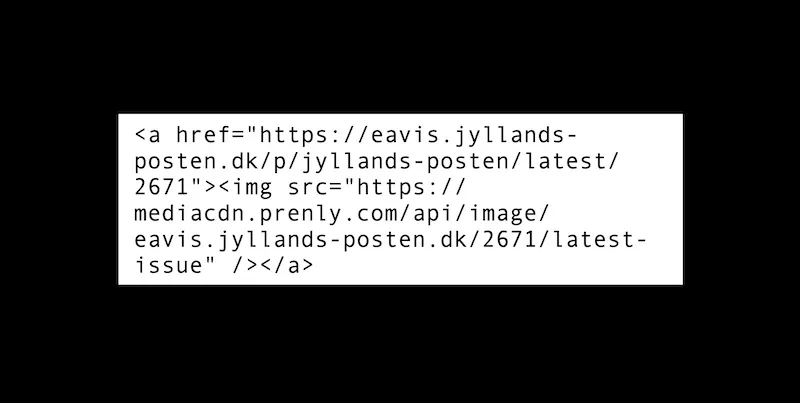
If you want to promote the latest issue of your e-magazine on your own website or in a newsletter, you can use our features to automatically link to the latest issue and display the cover of the latest issue. You can do this by inserting an HTML code on your website or in an email. You can easily customise the code by adding your own information. This is the html code to create an image of the latest issue with a clickable link that takes the visitor directly to it. *Be aware: Removed the space after "<" for the code to work. * < a href="https://{domain}/p/{title-slug}/latest/{title-id}"> < mg src="https://mediacdn.prenly.com/api/image/{domain}/{title-id}/latest-issue" /> < /a> You need to replace the variables in the code - title-id, title-slug and domain - with the ones that apply to your e-magazine. Example: If you want to use the code to display and link to the latest edition of Jyllands-Posten, use the following variables. {domain} =. "eavis.jyllands-posten.dk" {title-slug} = "jyllands-posten" {title-id} =. "2671" Which means that the full code is written like this: < a href="https://eavis.jyllands-posten.dk/p/jyllands-posten/latest/2671"> < img src="https://mediacdn.prenly.com/api/image/eavis.jyllands-posten.dk/2671/latest-issue" /></a> The link and image will always point to the last published issue in a title. This means that you never have to change the link, but when a new edition is published, the block will automatically be updated. The domain, title-id and tile-slug can be found in the usual URL of any replica page in your e-paper.
-

Menu settings for the web application
24 Oct 2025
It is now possible to create your own menu in the Web app, you can e.g. add external links, cookie and privacy policies and choose from a number of different icons for your menu items. This will change: “Login” will appear below the main menu and “Search” to the left of the main menu. You can shift “Search” to be under the main menu if you wish, where any remaining menu items will be visible. You can edit your menu at any time. To manage your menu in Prenly workspace here is a quick guide: 1. Log in to your Prenly Workspace account2. Go to "Applications"3. Select the application you want to manage the menu for4. Click on "Menu" on the right5. Select "Web Menu Settings"6. Manage your menu by drag and drop, add menu items or edit existing content. A maximum of two (2) icons in addition to the menu icon can be displayed in the top row of the home page. Other links end up under the menu icon. By default, the search icon appears in the top row, but it can be moved into the menu if desired and replaced by up to two other items. Add menu choices Click on "Add menu selection" and choose from - External link- Favorites- Podcast (add-on)- Title page- User selected title Note that grayed out options are not active for your license. Contact customer service or your personal sales representative for more information about these features. FavoritesFavorites is an easy way for users to select and find their most popular titles on the title page. PodcastShowcase your podcasts directly on the home page and on a special collection page.If you want to activate the podcast add-on, contact sales@textalkgroup.com and we will connect you with one of our sales representatives. Title pageBy activating the Title page, the application is given a new tab where the reader can get an overview of which titles are in the application and the option to open each title to access a descriptive text and all editions.Descriptions for each title are added under Edit Title.Here you can also activate favorites so the user can mark their titles as favourites. User selected titleA grouping of titles that the user can choose from. For example, if you have several editions or local variants in the same app and want to be able to offer the reader to choose their title. Add an external link 1. Enter a name for the link (this name will appear in the menu).2. Select icon. If you do not select an icon, a default link icon will appear (highlighted in green).3. Enter the URL you want to link to. Remember to test it in the browser first so it works.4. Select visibility.Whether the link should be visible regardless of whether you are logged in or not. Or if it should only be visible when you are logged in or logged out.5. Click the "Add" button. Sort the menu To sort the menu drag the bars (click the icon to the left of the icon, hold the mouse button and drag up or down). You can switch places on two menu items. For example, drag one menu item over another and they change places. It is of course also possible to drag to an empty place in the menu. Note that the text for "Log in" cannot be moved. It will always be directly below the main menu. Edit items in the menu If you want to change the name, icon, etc. of the menu items, click on the three horizontal dots and select "Edit". Delete items in the menu To remove items in the menu, click on the three horizontal dots and select "Remove". Note that some default objects cannot be deleted (marked with a padlock). When you are done with all the changes, don't forget to save your settings. We hope you will like this new feature as much as we do, if you have any questions please contact our support and they will help you.
-
Add and play podcasts in your apps
24 Oct 2025
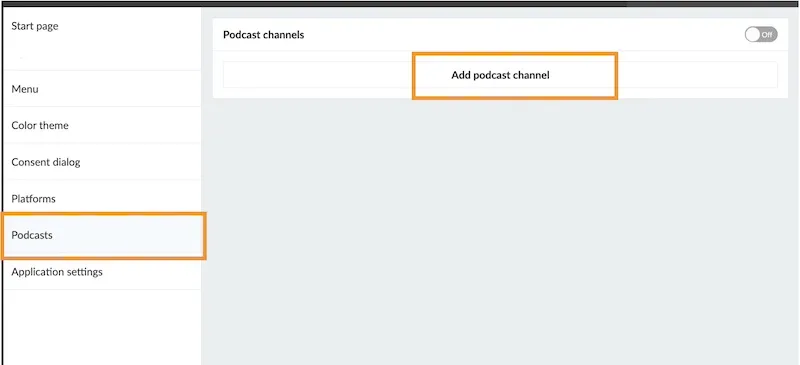
Display and play podcast episodes directly in your apps, so users can browse and listen without leaving the app. This keeps users in one place and gives them another reason to come back, even when there is no new publication yet. It’s a simple way to increase engagement and make your app more valuable. Live example See how podcasts look on the web application or mobile apps.thisis.prenly.com → How to activate it? If you are interested in the podcast feature, send us a message at hello@prenly.com.We’ll share pricing details and enable the feature for you. How does it work? Once the feature is enabled, you can add and manage podcasts in Prenly Workspace. Add a podcast channel Go to Applications Select your application Choose the menu option Podcasts Click on Add podcast channel Add your RSS feed and click Add Note: A podcast is always connected to an RSS feed, which contains all episode information and links to the audio files. Since Prenly does not host audio files, your podcast must be hosted externally (for example via Podbean, Libsyn, Buzzsprout, or your own server). Configure access (optional) You will be able to control access if you want to restrict access to subscribers only. Publish the podcast Turn the switch at the top to “On”. This activates the feature. Next, let's make sure the podcast is visible in your apps. Display podcasts in your apps On the startpage click “Add new component” choose “Podcast” configure how it should look You can decide whether to show episodes from all podcasts or only selected ones.Adding this component is important — it helps users discover your content faster and increases the chances that they actually press play. In your web application Add a podcast item in the menu of your web application Decide if you would like to place it in the expandable menu or as a visible icon next to it. On your native app Add a podcast section as a tab in your mobile apps Updates New episodes are automatically synced from your RSS feed. Note: Updates are not instant and may take a few minutes due to caching. Tip You are not limited to your own content either, as you can also include podcasts from partners to expand your offer and give your readers more to explore.
-
Using time zones in Prenly
24 Oct 2025
You can set your current time zone to make scheduling jobs in Prenly easier. The setting is made per account and applies everywhere where time is specified in Prenly Workspace. Unless you change the setting in your account, times are always based on Stockholm, Europe (+01:00) UTC. How to activate this 1. Log in to https://content.textalk.se/2. Select "My Profile" in the menu in the upper right corner3. Under the Time Zone section, set the current time zone you want your account to use. Questions and Answers Q: What happens when Sweden switches between summer and winter time?A: Your setting is then adjusted automatically.Q: Where does this setting apply?A: The time setting applies everywhere in Prenly, such as for push notifications and insert ads.Q: How are my colleagues affected by the time settings I make?A: The time settings are automatically converted and displayed according to the time zone that is set on each user's account.For example, if you select the time zone Helsinki, Europe (+02:00) and schedule a setting for 21:00, a Swedish colleague with the default setting Stockholm, Europe (+01:00) will see the time as 20:00 in their Prenly instance, adjusted to Swedish time.
-

Marketing link
24 Oct 2025
Create a sharing link for a specific publication. This is perfect for newsletters, social media campaigns, or “try it out” promotions. Please note that the marketing links can only be openend in the web app. How to do it: Go to Titles and find the publication you want to share. Click the three dots next to it and select Share. Market the publication by selecting "..." and thereafter "Share". You’ll see two options: The first option Market publication can be used to copy the web address (URL) to the publication, even if it has not yet been published. This option can be for instance used to prepare a newsletter, or create a QR code for an upcoming event. Note: This link does not give free access to users without a subscription. Select "Copy" to copy the publication's public URL. To give free access, use the second option Give access to publication and click Create link.It is possible to rename links so they are easy to distinguish —e.g. Christmas gift campaign 2025. Simply select copy and share the link with your readers (newsletter, social media, direct messages, etc.). You can deactivate the link anytime, for example when the campaign ends. See what status the link is in (be it active or inactive) in the column "Status" in the tabular view. Select the link to deactivate and then "Deactivate" to deactivate the link. Below you can see a deactivated link. Readers who used to be able to access the publication without subscription via the link will now require a subscription to read the publication again. A deactivated link can not be further used to bypass the subscription requirement of the publication.
-

A decade with Prenly: VK Media’s smarter way to publish e-paper
29 Sep 2025
Over the past decade, VK Media has stayed ahead by rethinking how news is delivered. In 2014, they launched a digital evening edition to give readers early access to the next day’s headlines. Ten years later, they faced a new challenge: delivering late sports results after the print deadline. With Prenly, they solved both — without disrupting editorial workflows.Customer stories about VK's e-paper in Prenly Challenge In 2014, Västerbottens-Kuriren (VK Media) wanted to give readers a preview of the next day’s newspaper the evening before print. They needed a solution that would allow digital publication of selected articles without interfering with existing editorial workflows. Ten years later, in 2024, a new challenge appeared: the print deadline was moved earlier in the afternoon — before most sports events had concluded. VK Media needed a way to deliver those results digitally, without adding extra work or delays. Solution In 2014, VK Media and Textalk co-developed the first version of Prenly — a platform for digital newspapers that went beyond flip-PDFs, offering native article views and support for fully digital editions. This allowed VK Media to launch a digital evening edition with selected content from the upcoming issue.The digital evening edition was made available to readers as a native article-based format. Later at night, once the full, redacted print layout became available, the article-based version was automatically replaced with the final digital print edition — giving readers access to the complete newspaper in its designed layout by morning.By 2024, the collaboration had evolved. VK Media now needed a way to publish late sports results — finalized after print — without adding pressure to existing workflows.. Together with Textalk, they developed “Mer Sport” (More Sport) — a digital supplement in Prenly, published alongside the full digital edition. How it works today VK Media sends the newspaper to print in the afternoon. Later in the evening, when sports articles are complete, they are exported to Prenly. Prenly creates a separate “Mer Sport” edition, with a cover generated from the first article’s headline and image. The sports supplement is bundled with the full digital edition, giving readers a complete and seamless experience. Why it matters For VK Media, this approach provides a clear business advantage: they can offer complete, up-to-date coverage without changing their print schedule or increasing newsroom workload. It saves time, lowers costs, and improves the overall reading experience for subscribers.Contact us to learn how Prenly can modernize your digital publishing workflow. Read Västerbottens-Kuriren here